The Same AI Wrote the Same Model Twice. Quantrix: 74 Formulas. Excel: 18,618.
Why an AI-built financial model is only as reliable as it is easy to audit.
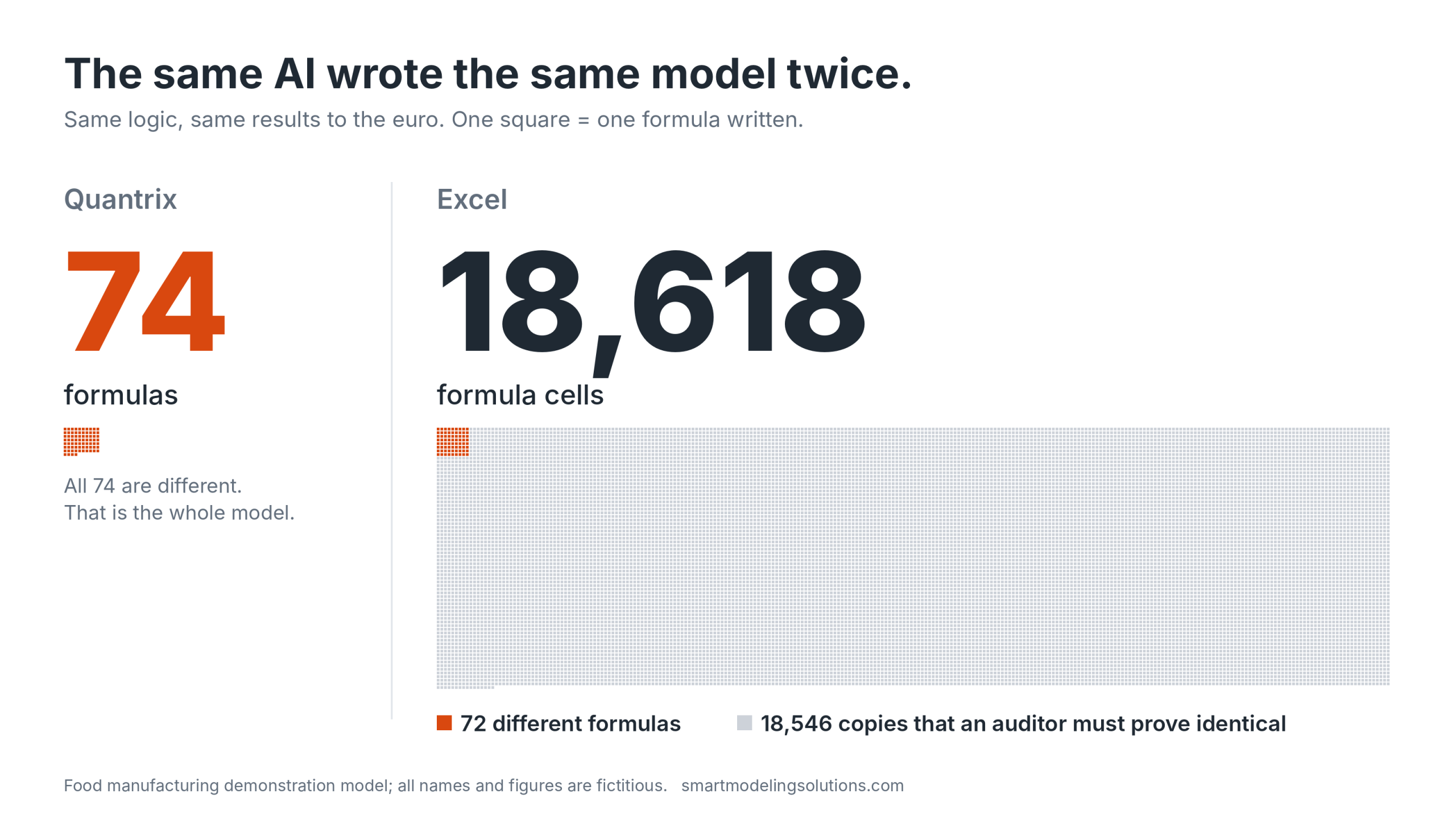
In short: We had the same AI write the same financial model twice. In Quantrix it wrote 74 formulas. In Excel it wrote 18,618. The results match to the euro. Then we counted how many of the 18,618 are actually different: 72. Excel needs no more logic than Quantrix. The other 18,546 are copies. That matters because nobody built this model. An AI did, so its reliability has to be established by a person who reads it. In Quantrix that person reads 74 lines. In Excel they must first prove that 18,546 copies are identical, and when we planted three errors among those copies, every check in the model still said PASS. An AI-built model is only as reliable as it is easy to audit.
Key facts
| Quantrix | Excel | |
|---|---|---|
| Same model, same results | Revenue year 1: EUR 99,611,716 | EUR 99,611,716 |
| Formulas written | 74 | 18,618 |
| Of which different | 74 | 72 |
| Copies an auditor must prove identical | 0 | 18,546 |
| Growing from 4 to 20 products | 0 formula changes | 16,782 new formula cells on 15 sheets |
| Three planted errors | Not possible, or shown as a new formula in the list | All checks PASS; EBITDA wrong by up to EUR 111,490 |
All names and figures in the model are fictitious. This post does not claim that AI makes fewer errors in Quantrix. No study has measured that. It claims that a person can audit the result, which is what makes an AI-built model reliable.
What happens when the same AI writes the same model twice?
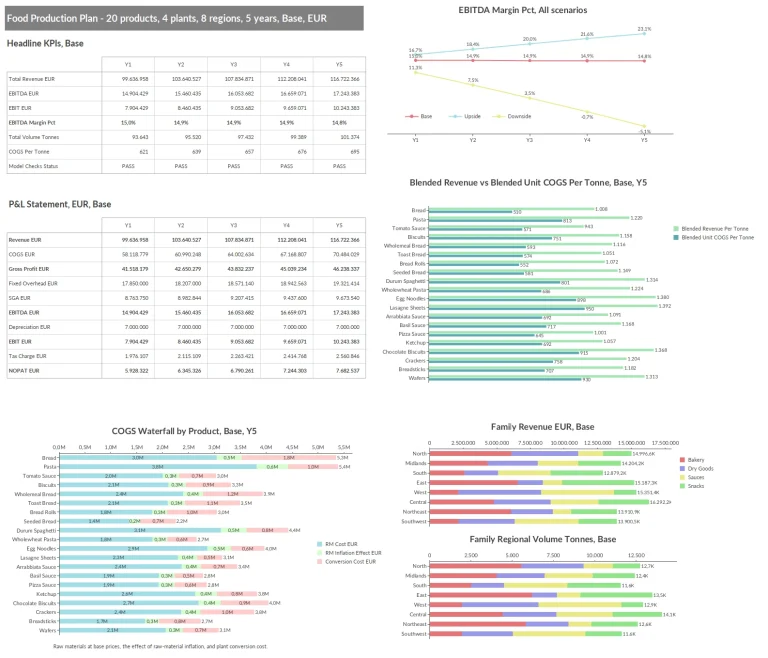
The model is our food manufacturing model: 20 products, 4 plants, 8 regions, 5 years, 3 scenarios, with a control layer that checks the model against itself. Our AI model builder had produced it in Quantrix from a plain-language brief. For this test the same AI wrote the same logic again as an Excel workbook.
We gave Excel its best case. One sheet per table, flat rows with a key for scenario, product, plant or region, lookups by key instead of by position, named ranges. The AI wrote a script that wrote every formula cell, so there were no slips of the hand. This is tidier than most workbooks we are asked to replace.
The two models agree. Revenue in the base case is EUR 99,611,716 in year 1 and EUR 116,711,002 in year 5 in both, and the largest rounding difference in the checks is EUR 0.50 in both.
| Quantrix | Excel | |
|---|---|---|
| Tables | 25 matrices | 26 sheets |
| Formulas written | 74 | 18,618 formula cells |
| Distinct formulas | 74 | 72 |
| Copies | 0 | 18,546 |
| Typical formula length | 107 characters | 110 characters |
The honest surprise is the third row. Built with discipline, Excel does not need more formulas than Quantrix, and they are not longer. Anyone who says an Excel model is “thousands of formulas” where Quantrix is 74 is overstating it.
The difference is the fourth row. Excel stores the 72 formulas 18,618 times, and nothing in the workbook tells you that they reduce to 72. We know only because we wrote a script to count them. A reviewer who opens the file sees 18,618 cells and has to establish that fact before reading a single rule.
Growth shows the same thing. The Quantrix model went from 4 to 20 products by adding items and data; its 74 formulas are identical before and after. In Excel the same step meant 16,782 new formula cells on 15 sheets, four named ranges redefined and five formulas edited. Each of those cells is a new place for a copy to go wrong.
What keeps the structure the same in every table?
Linked categories. In Quantrix the list of products is not typed into each table. It is one category, linked into every matrix that uses it. In this model Product is linked into 11 matrices, Year into 14 and Scenario into 24 of the 25. Add a product once and it exists in all 11, with the same name and in the same order. That is why the model grew from 4 to 20 products without a formula change.
In Excel each sheet holds its own copy of the product list. The same step meant new rows on 15 sheets, and nothing in the workbook guarantees that the lists still match. For a reviewer this is a second thing to prove before reading any logic: that every table has the same products, years and scenarios. In Quantrix the linked matrices share one list, so they cannot differ.
Why is an AI-built model only as reliable as it is easy to audit?
Because nobody built it. When a person builds a model, that person is the first control: they know which lines are unusual, where the exception in year 1 is, which input they were unsure about. They can vouch for it. A model written by AI arrives with no author. Whoever signs it off starts from zero, and the only way to establish that it is right is to read it.
So the practical question about an AI-built model is not how fast it was built. It is how much a person has to read before they can say it is correct.
In Quantrix the answer is the 74 formulas. Each is a statement about a named item that applies across every product, region, year and scenario, for example:
Revenue EUR = round(Calc_Regional_Volume::Regional Volume Tonnes * Selling Price Per Tonne, 0)There is no second copy for the next product or the next year. Where a rule really differs in the first year, it must be written as its own formula, so an exception is something you read, not something you have to find.
In Excel the answer has two parts. First prove that the 18,618 cells reduce to 72 rules, with no cell that quietly differs from its neighbours. Then read the 72. ICAEW’s reviewers explain why the first part cannot be skipped with AI: it is “notorious for changing formulas as it goes across a forecast”. (ICAEW, 5 June 2026) The research benchmark SpreadsheetBench 2 found the same from the other side: the two main reasons AI agents failed in real workbooks were that they inspected too little and wrote to the wrong cell. (arXiv 2606.29955)
What does a hard-to-audit model cost? Three planted errors
To see what the copies cost in practice, we put three errors into the Excel model, each of a kind ICAEW says AI makes. We planted them ourselves; the AI did not make them.
| Planted error | Model checks | Effect on EBITDA |
|---|---|---|
| A typed number over a formula, in one revenue cell | PASS | + EUR 111,490 in year 3 |
| A formula that changes in year 4 of one cost line | PASS | + EUR 12,874 and + EUR 13,526 |
| A formula that takes its price from the wrong row | PASS | + EUR 2,679 in year 2 |
With all three in place the model still reported PASS for every year and scenario. The checks are not badly built. They are the same six checks as in the Quantrix model, and they caught the two input errors we tested, an allocation of 105% and a product without a family, just as the Quantrix model does. They miss these three because a check that adds up the cells cannot see that one of the cells is wrong.
Excel’s own error checking did not help either. It put no warning on the typed number and none on the formula that changes in year 4. It did put its green “Inconsistent Formula” warning on every correct revenue cell we looked at, because price rows and revenue rows alternate on that sheet. A different layout would avoid the false warnings. It would still not flag a typed number.
What does find them is a comparison of every cell with its neighbours. Counting distinct formulas per sheet found one of the three. A row-by-row scan found all three. So they can be found, with a tool, by someone who knows to look.
We then tried the same three errors in the Quantrix model.
| Attempt in Quantrix | What happened |
|---|---|
| Type a number into a calculated cell | Not possible. A cell controlled by a formula does not open for typing |
| Give year 4 of one item a different rule | Possible only as a new formula. It appeared in the formula list, and Quantrix marked it as overlapping the general formula (“Eclipsed by 3”) |
| Refer to a cell by its position | Rejected: “There is no element named ‘F246’ in matrix ‘Calc_Revenue'” |
A Quantrix formula can refer to a neighbour, for example the previous year, but only by naming the dimension in the formula, once, for every cell it covers. A single cell cannot quietly point somewhere else.
One limit, stated plainly: this was a translation of the same logic, done to count fairly. It does not show what an AI builds in Excel from a brief alone. We are running that test next, with a new brief, and will publish it.
Can AI build a financial model you can trust?
As a draft, yes. As a finished model, the evidence says no. Wall Street Prep had four AI tools build a three-statement model and graded them like analysts: the best tool scored 5.9 out of 10, the weakest human analyst 6.4. Two of the leading tools invented part of the historical data, with line items slightly wrong and subtotals correct, so the model looked right. (Wall Street Prep, 2026)
| Test | Task | Best AI result |
|---|---|---|
| Wall Street Prep, 2026 | Build a three-statement model | 5.9 of 10; weakest human analyst 6.4 |
| SpreadsheetBench 2, 2026 | Real business workbooks, about 12 sheets and 590 cell changes per task | 34.9% of tasks; 12% of debugging tasks |
(SpreadsheetBench 2, arXiv 2606.29955)
ICAEW, the English chartered accountants’ institute, says AI became able to build strong models in early 2026, and in the same article tells its members to treat every AI-built model as a draft that must be checked.
Building has stopped being the bottleneck. Checking is the bottleneck now, and people were not good at it before AI: in Raymond Panko’s review of spreadsheet audits, inspectors found about 60% of the errors that were there. (Panko, 2015)
How do you audit an AI-built financial model, in Excel and in Quantrix?
ICAEW’s checklist is the best public list of what to look for. Some items exist because of the grid. Others have nothing to do with the tool.
| What reviewers are told to check | In Excel | In Quantrix |
|---|---|---|
| Formulas that change partway across the forecast | Any cell can differ; needs a consistency scan | One formula per line. An exception is a separate formula in the list, marked as overlapping |
| A typed number where a formula should be | Possible in any cell; neither our checks nor Excel’s error checking saw it | A calculated cell does not accept a typed number |
| Hard-coded numbers inside formulas | Possible, repeated in every copy | Still possible, in one visible place. Our IFRS 16 model has one on purpose: the 12-month short-term limit |
| Hidden sheets, rows and columns | A usual hiding place for logic | Logic is in the formula list of each matrix, not in the layout |
| Tables that should have the same products, years or scenarios but do not | Each sheet has its own list; needs a comparison | One linked category per dimension, shared by every matrix that uses it |
| Checks that work in the first year only | Each period’s check is its own cell | A check is one formula across all years and scenarios |
| Wrong range or wrong cell | Common in AI-built workbooks | Cell addresses are rejected. A wrong name or subset is still possible |
| A plugged balance sheet, wrong economics | Possible | Still possible. Someone has to read the formulas |
| Invented or wrong input data | Possible | Tool-independent. Data checks are needed either way |
| A different answer on a second attempt | Possible | Tool-independent. Two lists of 74 lines are easier to compare than two workbooks |
What does Quantrix not catch?
Anything that is wrong but well-formed. The first AI-built version of this same food model applied raw material inflation to the base cost every year instead of compounding it, so margins widened for no business reason. It also had inputs for each year that the formulas never read. Neither produced an error message. Both were found by reading the formulas.
The control layer has blind spots as well. With the allocation set to 105%, the volume and allocation checks failed as they should, while the P&L checks stayed green with revenue overstated by about EUR 1.2 million. Checks catch what they were built to catch.
So the structure removes the errors that come from copies and positions, and it makes the reading short. Errors of meaning stay with a person who knows the business.
Can AI audit the model for you?
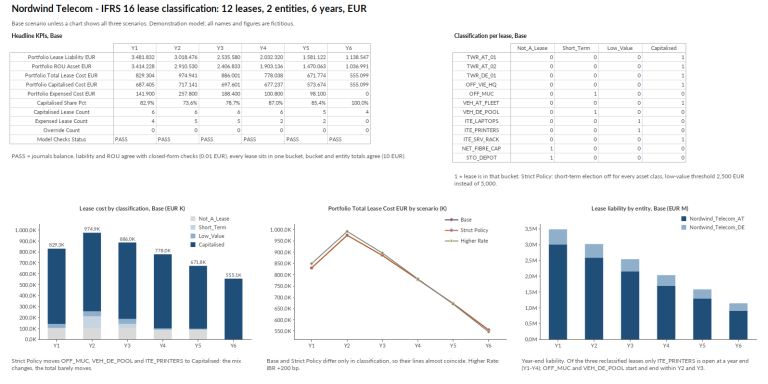
Not as the reviewer. In SpreadsheetBench 2 the best AI solved 12% of the debugging tasks in realistic workbooks. AI is far more useful as a second reader when the logic is short and explicit, because then it can be held against a rule. This line from our IFRS 16 lease model can be compared directly with paragraph 18 of the standard, by a person or by an AI:
Lease Term Months = Non Cancellable Months + Extension Option Months * Extension RC Flag + Termination Option Months * (1 - Termination RC Flag)There are 91 such lines in that model. They are the same 91 for 12 leases and for the 4,500 leases we tested it with.
Where does Excel still win?
In several places, and it is better to say so.
- AI knows Excel better. There is far more Excel than Quantrix in what AI models have learned from. Our builder needs its own rule set and two automated verifiers to produce correct Quantrix syntax.
- Small models are fine in Excel. A model a person can read in an afternoon does not need another tool.
- AI is built into Excel. Quantrix has no built-in AI. Our model builder is a service on top of it.
- Excel can be disciplined. Our own test shows it: 72 formulas, same results. Structured tables and named ranges help, and Arup’s research on Copilot found it works better with named tables than with loose ranges. (Arup AI Playbook, 2026)
Microsoft goes further and argues that Excel is the natural place for AI’s work because, as Sumit Chauhan writes, “computation and explanation coexist in the grid”: the AI leaves formulas a person can inspect, not just an answer. (Microsoft Excel Blog, 29 January 2026) We agree that a model you can open beats an answer you have to believe. But inspectable is not the same as checked. Every one of 18,618 cells can be inspected. The question is how many a person must inspect before signing. In Excel the discipline is something the AI has to choose and keep in every cell. In Quantrix it is the only way a model can be written.
How is this different from Anaplan’s or Cube’s argument?
They make a different point. Planning platforms such as Anaplan and Cube argue that AI gives better answers when it reads governed data and logic that already exist in their system. That is grounding: what the AI stands on when it answers.
This post is about verification: what a person must read when the AI has written the model itself. Both can be true. A team can have well-governed data and still be handed an AI-built model nobody has time to check.
An idea from 1991
Lotus Improv separated formulas from data and used names instead of cell addresses in 1991. Quantrix descends from it. It was a better way to build large models then. It matters more now that the first draft is written by a machine and the human’s job is to read it.
How we build and check models with AI
You describe the model in plain language and approve the architecture before anything is built. The AI writes a model definition as text, which two automated verifiers check before it is imported into Quantrix. Inside the model a control layer recalculates key totals along a second path and shows PASS or REVIEW for every year and scenario. We plant errors to prove the checks fire, and the reported figures are recalculated independently. Then a person reads the formulas, which is realistic only because there are 74 of them and no copies.
The food manufacturing and IFRS 16 models, with their formulas and briefs, come free with the 30-day Quantrix trial, and we build your first model from your own brief at no cost: AI Quantrix model builder. If your model has outgrown Excel, see Quantrix as an Excel alternative for large models.
Get Full Access to Quantrix – Free for 30 Days
We ask for a few details to send your download link and help you get started. Your info stays private, no spam, no credit card.
Why It is Worth Your Time: