Large Retail Budget Model in Quantrix: 500 Million Cells, 127 Formulas, No Spreadsheet Limits
In short: Retail budgets are where Excel runs out of room. Every store, product group and week multiplies the number of cells, until the workbook is split into many linked files that take minutes to open and nobody fully trusts. Many of our clients come to Quantrix at exactly that point. This free demonstration model shows why: a weekly merchandise plan and store P&L for a fictitious grocery chain with 240 stores, 30 subcategories, 52 weeks, three years and three scenarios, 33 million cells calculated by 127 formulas. We then grew the same model to 750 stores and 155 subcategories, 500 million cells, on a laptop with 16 GB of memory, without changing a single formula, and every result still matched an independent recalculation to the euro. The model checks itself and comes free with the 30-day Quantrix trial.
Key facts
| Size | 33 million cells, 47 matrices, 127 formulas; the same 127 formulas tested at 107 million and 500 million cells |
| Stores | 240: 20 hypermarkets, 90 supermarkets, 100 convenience stores and 30 discount stores in 5 regions; 24 new stores open over the three years |
| Product structure | 30 subcategories in 8 departments, from fresh produce to personal care |
| Time | 52 weeks a year on a 4-4-5 retail calendar (12 periods), 3 years |
| Merchandise plan | Sales, markdown, shrink, COGS, gross margin, opening and closing stock, planned receipts and open to buy, by store, subcategory and week |
| P&L | 40 store cost accounts in 11 groups, 7 central cost centres and 16 projects allocated to stores; P&L by store, format, region and company |
| Scenarios | Base · Upside (stronger trading) · Downside (weaker trading, delayed and cancelled openings) |
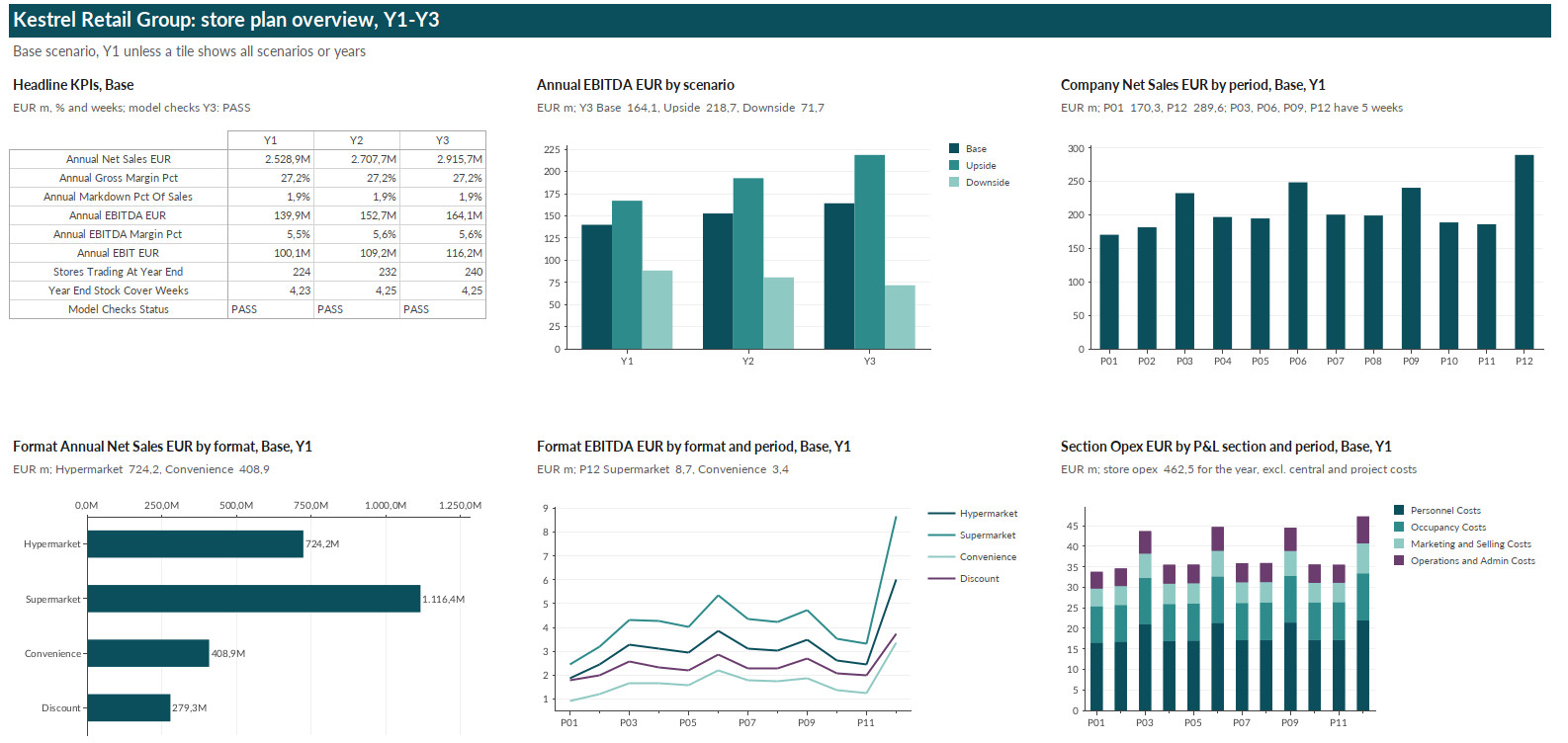
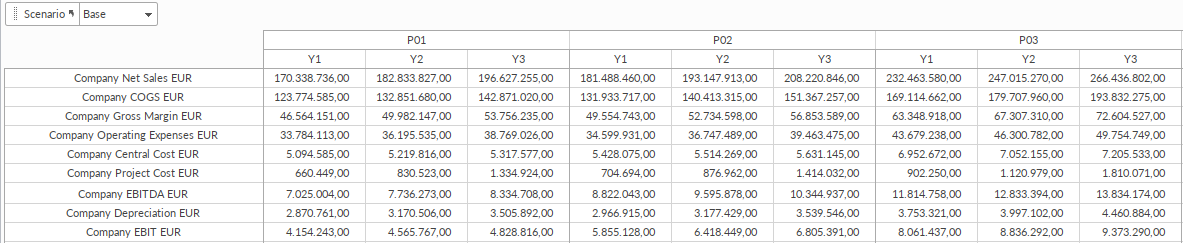
| Base results, year 1 | Net sales EUR 2.53 billion · gross margin 27.2% · EBITDA EUR 139.9 m (5.5%) · year-end stock 4.2 weeks of cover |
| Built-in checks | Sales, stock and cost mapping bridges, stock floor, allocation checks; PASS in all scenarios and at every size |
| Availability | Free with the 30-day Quantrix trial (240-store version) |
Why do retail budgets outgrow Excel?
Because the detail multiplies. An Excel sheet holds up to 1 048 576 rows and 16 384 columns, but a budget becomes unusable long before it reaches that limit, because every calculated value is a separate formula that has to be stored, recalculated and kept consistent. In retail the numbers grow fast: 240 stores × 30 subcategories × 52 weeks × 3 years × 3 scenarios is 3.4 million combinations, and each of them needs sales, margin, stock, receipts and open to buy: about 30 million values in the merchandise plan alone. The workbook gets split by region, by department or by year, linked together, copied for each scenario, and every change to a rule has to be repeated in all the copies. At some point the file is too slow to open, too large to send and too risky to change.
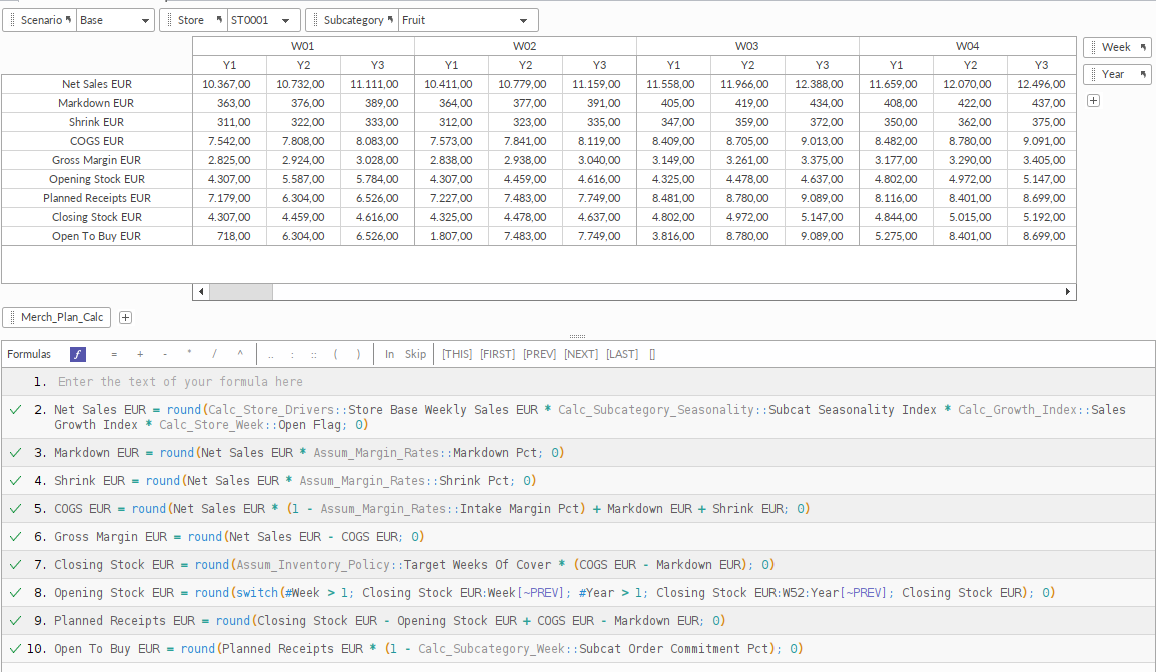
In Quantrix the same merchandise plan is nine formulas. Store, subcategory, week, year and scenario are dimensions of one model, and each formula is written once for all of them. More stores or more product groups mean more items and more data, not more formulas or more files.
How large can a Quantrix model get?
We built this model at three sizes from the same definition, changing only the number of stores and subcategories:
| Size | Stores × subcategories | Cells | Full recalculation | File size |
|---|---|---|---|---|
| Demo (free with the trial) | 240 × 30 | 33 million | 37 seconds | 60 MB |
| Large | 480 × 50 | 107 million | 108 seconds | 180 MB |
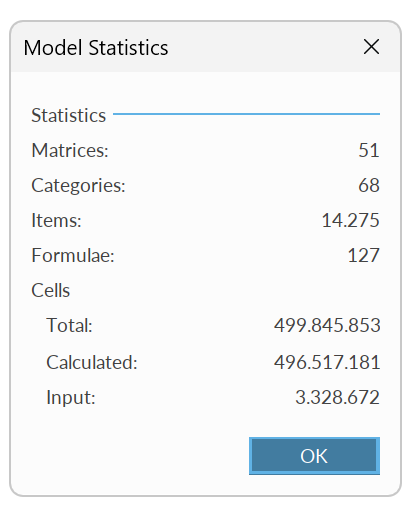
| Extra large | 750 × 155 | 500 million | 18 minutes | 743 MB |
A full recalculation means every cell of the model, in all three scenarios, calculated from scratch. All three sizes ran on a laptop with 16 GB of memory; at 500 million cells Quantrix used 5 GB. At every size and in every scenario, the key results matched an independent recalculation to the euro and all checks passed. A full recalculation is the slowest case, not the everyday one: Quantrix recalculates only the cells a change affects, so a change in rent indexation took about 3 seconds even at 500 million cells.
What does a retail budget model need to do?
A retail plan has two halves that are usually built in different places. Merchandise financial planning (MFP) works by store, product group and week: what will sell, at what margin, how much stock is needed and how much buyers can still order. Finance works by store and period: costs, central overheads, projects and EBITDA. When the two live in separate spreadsheets, a change in the sales plan reaches the P&L late, by copy and paste, or not at all.
This model keeps both halves in one place. The weekly merchandise plan feeds the store P&L directly, and the store P&L rolls up to format, region and company. Change a sales driver, a margin rate or the stock policy for one subcategory, and the stores, the P&L and the open-to-buy budget move together.
How are sales planned by store, subcategory and week?
Sales start from what a square metre sells: a weekly sales density per format and subcategory, multiplied by each store’s selling area. That base is then shaped by:
- Seasonality by department and week, with summer, Easter and Christmas peaks, averaging 1.0 over the year. Weeks roll up to 12 retail periods on a 4-4-5 calendar (two four-week periods, then a five-week period, in each quarter), so every period has whole weeks and years compare like for like.
- Growth: like-for-like volume and price inflation, compounding year by year.
- Opening dates: a new store sells from its opening week, so its costs, stock, depreciation and opening capex start with it.
How does the model calculate margin, stock and open to buy?
For every store, subcategory and week:
- Gross margin = intake margin − markdown − shrink, all as rates by subcategory
- Closing stock at cost = target weeks of cover × weekly cost of sales
- Opening stock = last week’s closing stock; week 1 of a new year carries over week 52
- Planned receipts = closing stock − opening stock + cost of sales
- Open to buy = planned receipts less the share already committed to suppliers
How does the store P&L work?
Each of the 40 cost accounts can follow one of four rules, set by format: a percentage of sales, EUR per square metre, EUR per employee (FTE) or a fixed amount per store. Per-square-metre costs follow rent indexation, per-employee costs follow wage inflation and fixed costs follow general cost inflation. One formula covers all four rules, so changing how an account behaves is a data change.
Head office and distribution centre costs are allocated to stores by their share of company sales. Project budgets go first to store formats by weight, then to stores by their share of format sales. The result is a P&L by store and period that adds up to format, region and company.
What happens in a weaker year?
| Year 3 | Base | Upside | Downside |
|---|---|---|---|
| Net sales | EUR 2.92 billion | EUR 3.06 billion | EUR 2.59 billion |
| EBITDA | EUR 164.1 m | EUR 218.7 m | EUR 71.7 m |
| EBITDA margin | 5.6% | 7.2% | 2.8% |
| Stores at year end | 240 | 240 | 224 |
The Downside scenario cuts like-for-like volume, adds markdown and shrink, raises wage, rent and cost inflation, delays the first year’s openings by eight weeks and cancels the rest. Sales in year 3 are 11% below Base, but EBITDA falls by more than half. Retail margins are thin: a few points of markdown and cost inflation decide the year. The Upside scenario does the opposite: more volume, less markdown and shrink, softer cost inflation and earlier openings.
How does the model check itself?
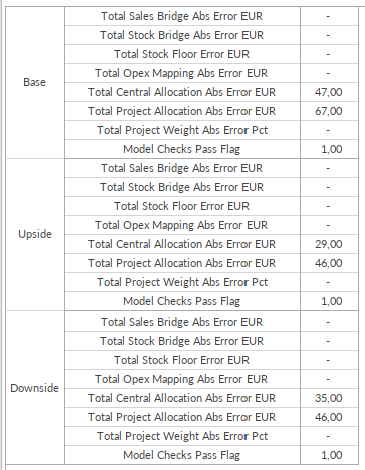
- Sales bridge: sales summed by subcategory and week equal sales in the company P&L
- Stock bridge: year-end stock by store equals stock by department
- Stock floor: no closing stock below zero
- Cost mapping: every account reaches a line group and a P&L section
- Allocations: allocated central costs and project budgets equal what was budgeted
The dashboard shows PASS or REVIEW for each scenario. The small values in the allocation checks, at most EUR 67, are rounding in the allocation chains, well inside the tolerance of EUR 100.
What does one model instead of many files change in practice?
- One change, one edit: a new stock rule or cost method is changed once and applies to every store, subcategory, week and scenario. In a split Excel budget it has to be copied into every file and sheet.
- Growth without rework: a new store or subcategory is one item plus its data. This model grew from 33 to 500 million cells without a new formula.
- Auditability: a reviewer reads 127 named formulas, not millions of copied cells.
- Scenarios side by side: Base, Upside and Downside are one dimension of the same model, not three copies of the workbook.
If your budget has already been split into many linked workbooks, it can be rebuilt as one model; see the OYAK Beton case, where more than 150 spreadsheets in 10 files became one Quantrix model.
How was this model built?
The model was generated from a plain-language brief with our AI Quantrix model builder, following our modelling rule set, and built in Quantrix by our import scripts. Before it was built, an independent recalculation produced the expected results for every scenario, and the Quantrix model matched them to the euro at all three sizes. The same method works for your own stores, formats, product hierarchy and chart of accounts, and also from an existing Excel budget, which the builder can use as a reference: it takes over the logic, makes hidden assumptions explicit and adds checks that the spreadsheet did not have.
What does the model not include?
It demonstrates retail budgeting; it is not a complete retail planning system:
- No balance sheet or cash flow statement
- No supplier payment terms or working capital beyond stock
- No price and promotion planning by article; plans stop at subcategory level
- No labour scheduling: staff costs follow FTE and wage rates
- No actuals, reforecast or plan-versus-actual comparison
- No interface to an ERP or point-of-sale system (data is entered or loaded from files)
- One currency (EUR)
Each of these can be added to the model, because its structure and formulas are open.
Get the model with your free trial
The 240-store version of the model is included with the free 30-day Quantrix trial. Request the trial below and we will send you the model with the download link. If you would like it adapted to your own stores and accounts, or built from your current Excel budget, say so in the message field.
Get Full Access to Quantrix – Free for 30 Days
We ask for a few details to send your download link and help you get started. Your info stays private, no spam, no credit card.
Why It is Worth Your Time: